Is Search Console a rank tracker? Where the free data stops
Search Console tells you an average position across searchers, devices, and countries, for the queries it chooses to show you. That is enough for a lot of sites. Here is how to tell whether yours is one of them.
Can you check keyword rankings for free?
Yes, for your own site, in Google Search Console. It costs nothing, it is Google's own record rather than a third party's guess, and it reports the metric a rank tracker cannot: clicks. For a site that wants to know whether SEO is working, Search Console is the first answer and sometimes the only one needed.
What it does not give you is a rank. It gives you an average position, and the difference matters more than the name suggests.
What Search Console's position is
Every time your site appears in a result set, Google records the position of your highest result. The number in the report is the mean of those positions across every impression in the date range, every device, every country, and every query that rolls up into the row you are looking at.
So a query at "position 8.4" might be position 3 on desktop in one state and position 14 on mobile everywhere else. A page at "position 12" might be at 5 for one query and 30 for another. The average is true and it hides the shape.
Three other properties of the data shape what you can do with it:
-
Recent data can be preliminary. The 24-hour view shows data within hours. Finalized reports arrive later, and recent figures can change.
-
It keeps 16 months. Grant Simmons, who ran search at Homes.com and now works with Fiat Growth, points out that this is the part people waste: "generally you get a lot more information when you look at the 16 months of Google search console data to have an understanding of if the article has been around for that long all the queries that have mapped not just the most recent queries I think that's often forgotten." His episode on measurement is on the Unscripted SEO podcast.
-
It does not show every query. A share of your clicks arrive on queries Search Console never reports, for privacy reasons. I have a post that earns about a hundred clicks a month, and the query report explains twelve of them. The Dark Query Problem is about what to do with the rest.
There is one more thing worth knowing if you compare Search Console across time. In the autumn of 2025, Google stopped serving 100 results on a single page. Rank trackers had been fetching that page for years to record deep positions, and every fetch counted as an impression for every site on it. When the page went away, desktop impressions fell across the industry at once. If your impressions chart has a cliff that month, that is the cliff, and it was never people.
What a rank tracker adds
A tracker asks Google a specific question on a schedule you set: for this keyword, from this location, on this device, where does this domain appear, and what else is on the page? It records the answer as a number, not an average.
A tracker puts these measurements together for each scheduled check:
- A single position for one keyword on one device in one place, comparable week to week.
- The ranking URL for that check. Search Console also reports URLs when you group by query and page; a tracker records which URL appeared in the specific search it ran.
- The previous position, so movement is a number in a column rather than a chart you squint at.
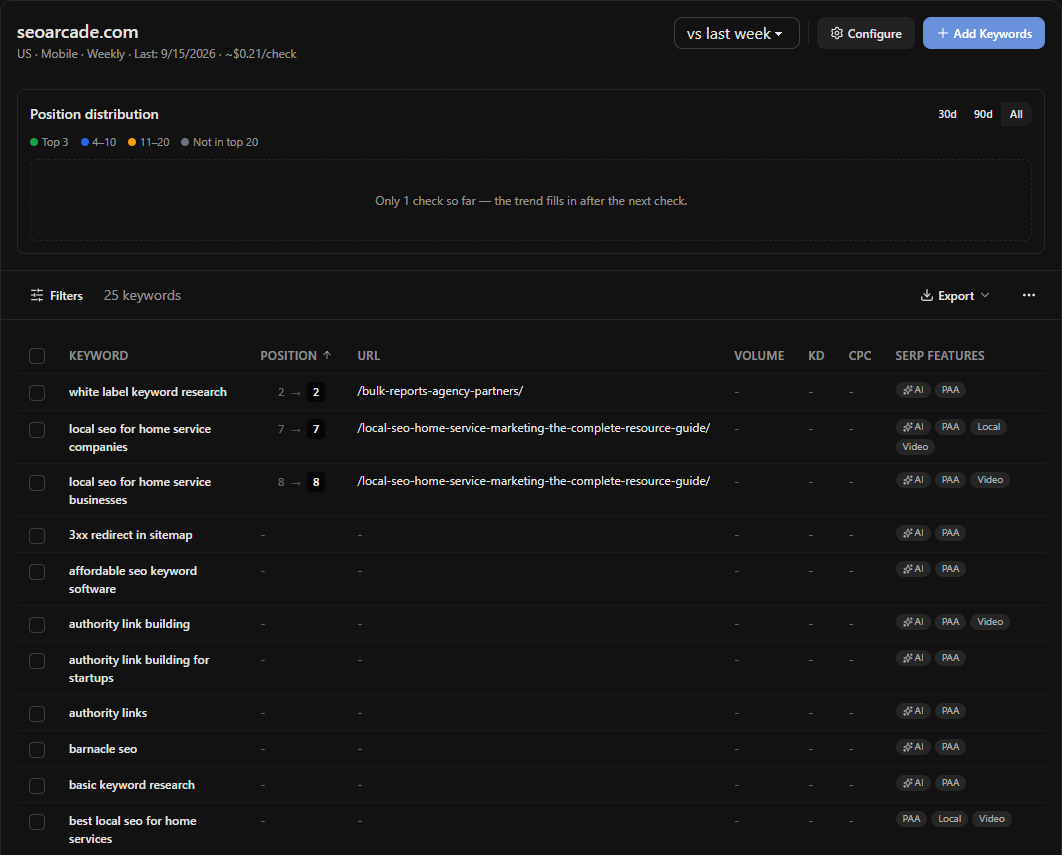
- SERP features on the page: an AI overview, a local pack, a video carousel, a shopping block. When your position holds and your clicks fall, this column is usually the reason.
- Competitors' positions, for terms you do not rank for at all. Search Console has nothing to say about a query you never appeared for.
Here is what the difference looks like on a real tracker. The 25 keywords below were chosen because Search Console reported seoarcade.com at average positions between 2 and 20 for them. After one mobile check from the US, three had a position; the other 22 were not in the top 40 at all. The averages were true. The positions were not there.
The cost is that every one of those answers is a paid request. In OpenSEO, scheduled checks run through a queue that prices out at a fraction of a cent per keyword per device, so a 25-keyword weekly tracker costs about $0.25 a month; a one-off live check costs around three and a half times more per keyword. On the hosted app, rank checks need the $10 plan, which includes $10 of credits each month. Search Console reads in OpenSEO cost nothing at all.
When Search Console alone is enough
More often than tool vendors admit. Search Console is enough when all of the following are true:
- You have one location and one language, so the average is not blending markets.
- You can read direction from a chart and do not need a position to the decimal.
- Your questions are about your own pages, not a competitor's.
- The pages you care about are ones Google already shows, so the query rows exist.
A ten-page consultancy site, a regional service business with one office, a founder checking whether the launch post is gaining: Search Console, filtered to the right page and device, answers the question. Adding a tracker adds a bill and a second dashboard without adding a decision.
When you need the tracker
Four situations, and one of them is usually what tips it.
- You are local. Position depends on where the searcher is standing, and Search Console's country filter is far too coarse. Local rank tracking covers this.
- You report upward. "Average position improved from 14.2 to 13.1" is a sentence nobody can act on. "Nine of the twenty terms tied to the pricing page moved onto page one" is. Search Console cannot produce the second sentence without a lot of manual work each week.
- You need to know why clicks fell while position held. That is the SERP features column.
- You want a competitor in the same table. Search Console is a first-party tool and will never report someone else's site.
Use both, in the right order
The workable pattern is Search Console first and the tracker second. Search Console picks the keywords, because it knows which queries already show your site and how far down; which keywords to track is that process. The tracker then follows those terms with the precision Search Console lacks. Then Search Console comes back at the end, because clicks are the number the tracker cannot produce, and a report that shows positions moving without showing what the clicks did is half a report.
Run this with the OpenSEO MCP
Connect Search Console to the project, then connect the OpenSEO MCP. The first three steps use no credits.
Using the OpenSEO MCP on project [name]:

1. Pull Search Console performance for the last 28 days by query and
   device. Show me the 20 queries with the most impressions, with
   position on mobile and on desktop side by side. Flag any query
   where the two positions differ by more than 5.

2. Pull the same 20 queries by query and page. For any query that
   returns two of my URLs, list both with their impressions.

3. Pull the last 16 months by date for the whole property and tell
   me whether impressions dropped by more than 30% in any single
   week, with the week.

4. Call get_rank_tracker for this project and list the tracked
   keywords with their latest mobile position and previous position.
   For each one that is also in the Search Console list, put the two
   positions in one row: tracker position, Search Console average.

5. Tell me which keywords I am tracking that Search Console shows no
   impressions for, and which Search Console queries with more than
   500 impressions I am not tracking.
Step 4 is where the difference shows. The tracker position and the Search Console average for the same term will not match, and the gap between them is the blending this page is about. Step 5 keeps the two lists honest with each other over time.
The free data is the ground truth for clicks
Everything a tracker reports is a description of a results page. Search Console is a record of what people did on it. When the two disagree about whether things are going well, the clicks are right and the positions are the explanation. Set them up in that relationship from the start and you will read both correctly.
Search Console and rank tracking FAQ
Is Google Search Console a rank tracker?
Not in the usual sense. It reports an average position per query or page, blended across devices, countries, and dates, for your own verified site only. Its 24-hour view shows recent preliminary data; finalized reports arrive later. A rank tracker records one position per keyword, device, and location on a schedule, and can include sites you do not own.
Why does my Search Console position not match the rank tracker?
Because they measure different things. Search Console averages your best position across every impression in the period, so a term that is 3 in one state and 15 elsewhere reports as something in between. A tracker reports the position from one place on one device on one day. A gap of several positions between them is normal.
How accurate is Search Console average position?
It is Google's own count of where your result appeared, so the impressions and clicks are as accurate as any data you will get. The position is accurate as an average; it is not a rank. Filter by device and country and the average becomes much closer to what a searcher sees.
How do I check keyword rankings for free?
Open Search Console, go to Performance, filter to the page or query you care about, and switch on the average position metric. Filter to a single device and country to make the number meaningful. That covers your own site; for a competitor's rankings you need a tool that fetches results, which costs money wherever you do it.
Does OpenSEO use credits to read Search Console?
No. Search Console and URL inspection reads are free in OpenSEO, in the app and through the MCP. Rank tracking checks use credits because they fetch live results, and on the hosted app they require the $10/month plan, which includes $10 of credits.
Run this strategy in OpenSEO
Run the MCP prompt in this guide with OpenSEO. OpenSEO is open source, free to try, and does not require a credit card.
