Query-mine the Search Console you already own
Your own Search Console is the only keyword database built from people who reached you. The strategy for mining it: striking-distance keywords, zero-click pages, and the queries Google won't name.
What is programmatic keyword discovery?
Programmatic keyword discovery means treating your own Search Console as the keyword database, then working it in bulk instead of one query at a time. Every other source estimates demand from the outside. Search Console reports demand that already found you, on the pages that already exist, with the positions you already hold. It is the only first-party keyword data you own, and most sites read maybe two screens of it a month.
The catch is that Google hands it to you in a shape designed for spot checks rather than strategy. Working it programmatically means pulling the whole surface through an API, joining it to your rankings, and asking questions the interface will not answer.
Why your query report is missing most of your clicks
Open a page report and note the click total. Then add up the clicks in the query table underneath. The second number is smaller, often dramatically so. Google anonymizes queries below a privacy threshold, so the searches that drove most of your traffic never appear by name.
The gap is worse than most people assume. On one of my own pages earning around a hundred clicks a month, the interface named five queries. Going through the API raised that to twelve. Out of a hundred clicks, I could name twelve of them, on a page I wrote and understood.
That is the problem the dark query post works through in detail. This page is the repeatable strategy that comes out of it.
Grant Simmons, who has built SEO tooling for years, adds a confidence score to his estimates:
Most of my tools, I add in a confidence score, because the math is just math and reasoning is just reasoning.
He is also skeptical that the gap can be closed outright, on the grounds that you are still dealing with garbage in and garbage out. Both things hold. You cannot recover the exact hidden queries, and you can still assemble a defensible picture of them from data you already hold.
How to find striking-distance keywords in Search Console
Striking-distance keywords are the terms where you rank between roughly position 11 and 30. They earn few clicks and prove Google already considers your page a credible answer. Moving one of them onto page one is cheaper than earning a new ranking from nothing, which makes this the highest-return query mine on most sites.
The workflow runs in four steps:
- Pull every query for the property over the longest window available, not the default three months.
- Filter to positions 11 to 30 with impressions above your own noise floor.
- Group those queries by the page currently ranking, which turns a keyword list into a page-by-page work queue.
- Sort each page's group by impressions, because impressions measure demand that Google is already showing you losing.
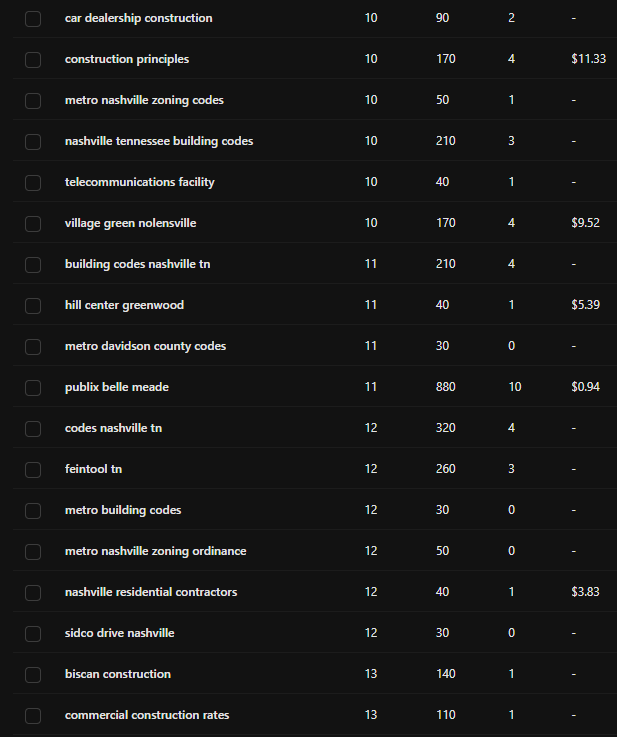
The list above is one site's striking-distance band, filtered to positions 10 through 13. Nothing here is a head term, and that is the point: these are queries the site already half-ranks for, several of them worth a few hundred searches a month, all of them sitting one page away from traffic.
Step three matters more than it looks. Sorting by query treats every row as its own project. Grouping by page tells you which single URL to improve to capture a dozen of them at once, which is the same logic behind clustering keywords into topical hubs.
The 16-month window most people skip
Search Console's default view is short, and the export most people take is shorter. Grant's practical advice is to stop working from the recent slice:
Generally you get a lot more information when you look at the 16 months of Google Search Console data, to have an understanding of, if the article has been around for that long, all the queries that have mapped, not just the most recent queries. I think that's often forgotten.
Sixteen months is the full retention window Google offers. Pulling all of it changes what you can see: seasonal queries that vanish from a 90-day view, terms a page ranked for before a redesign, and the slow drift of a page away from the topic it was written for. A query that appeared for six months and stopped is a signal. A 90-day export shows you an absence instead.
Zero-click pages and the queries worth rewriting for
The other half of the mine runs in the opposite direction. Look for pages with heavy impressions and almost no clicks. High impressions confirm Google shows the page for real demand. Near-zero clicks means the title and description are losing the auction, or the page is answering an intent the searcher did not have.
Sort those by impressions and read the queries attached. When the queries do not match what the page is about, you have found a page drifting off its topic, and the fix is usually a split rather than a rewrite. When the queries match and the clicks still do not come, the fix is the title. Both are cheaper than new content, and both come from data you already own.
Do it with OpenSEO
Because the Search Console connection runs through OpenSEO, your agent can query it alongside your ranking data without a second integration. Connect the OpenSEO MCP once, or read how the Search Console MCP fits together, then run the workflow with this prompt.
Using the OpenSEO MCP, pull Search Console query data for
[mydomain.com] over the longest window available.

1. Striking distance
Filter to queries in positions 11-30 with more than [50] impressions.
Group them by the page that ranks, then sort each group by total
impressions. Give me the top 10 pages by recoverable impressions.

2. Zero-click pages
List pages with high impressions and a click-through rate under 1%.
For each, show the queries driving the impressions and tell me
whether they match the page's actual topic.

3. The gap
For my top 10 pages by clicks, compare total clicks against the sum
of clicks in the named-query table. Report the difference as a
percentage. Those are the pages where I am planning blind.

Output as a document I can review.
The output is a work queue ordered by what it would cost to fix, rather than a keyword list ordered by a volume number that was never about your site.
What to do first
Run step one against your single most important page. If the striking-distance group has more than five queries in it, that page is the next thing you should edit, and you now know which ten words to edit it around. Then widen the window to sixteen months and see what used to work.
From here, the queries you surface feed the rest of the library. Unnamed question queries belong in long-tail question mining. Grouped page queries belong in topical hubs. Anything with buying language belongs in intent mapping before you write a word.
Search Console keyword research FAQ
Can you use Google Search Console for keyword research?
Yes, and it is the most reliable source you have, because it reports queries that reached your site rather than estimating a market. Its limits are that it only shows terms you already rank for, and it hides queries below a privacy threshold. Use it for expansion and validation, and use a keyword tool for the demand you have not captured yet.
What are striking-distance keywords?
Queries where you rank roughly between positions 11 and 30. They sit on page two, earn few clicks, and demonstrate that Google already treats your page as a plausible answer. They are the cheapest rankings to improve on most sites.
How far back does Google Search Console data go?
Sixteen months. Most exports default to a far shorter window, so pulling the full range surfaces seasonal queries and historical rankings that a 90-day view hides.
Why don't the clicks in the query table add up to the total?
Google anonymizes queries that too few people searched, so they never appear by name while their clicks still count in the total. The shortfall runs from a small fraction to most of the total depending on the size of the site. Reading the same pages at page level rather than query level recovers much of the count.
Run this strategy in OpenSEO
Run the MCP prompt in this guide with OpenSEO. OpenSEO is open source, free to try, and does not require a credit card.