Keyword gap analysis: subtract the brand terms first
A raw keyword gap between you and a competitor is mostly noise, because most ranked-keyword lists are mostly brand. How to strip brand from both sides and turn the remainder into a page plan.
What is a keyword gap analysis?
A keyword gap analysis compares the keywords a competitor ranks for against the keywords you rank for, and treats the difference as your opportunity list. It is the single most requested competitive report, and in its raw form it is close to useless.
The reason is arithmetic. Pull the ranked keywords for a well-established competitor and a smaller site in the same market and the two numbers are not comparable. Here is a real pair from the property restoration category: the national brand ranks for 49,475 organic keywords. The regional operator ranks for 79.
A raw gap analysis reports that as 49,396 opportunities. That number is not a plan. It is a way of feeling behind.
Why your ranked-keyword list is mostly your own name
Look at what the smaller site actually ranks for, sorted by traffic.
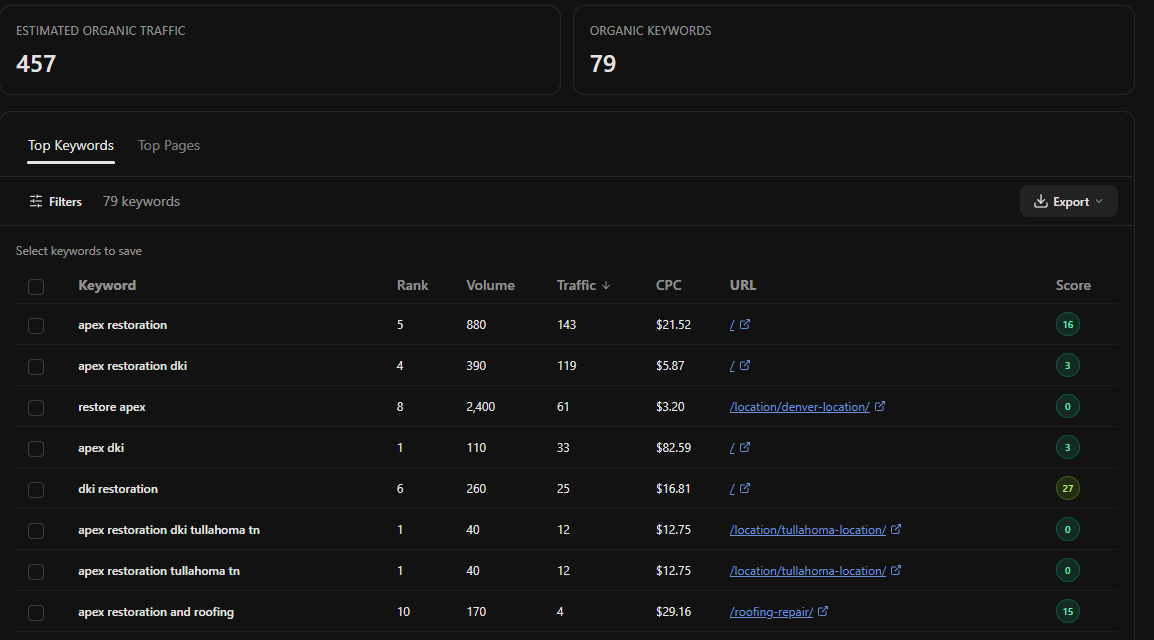
Every row at the top of that list is the company's own name in some arrangement. Below the fold it gets stranger: the site also ranks for several other restoration companies' brand names, for a street address, and for a local civic app that happens to share a word with one of its city pages.
Strip all of that out and the genuine service rankings are a short list: one city plus water damage at position 19, one city plus mold removal at position 18, one city plus fire damage at position 18. Three real footholds, not 79.
That is the actual starting position, and it is much better news than the raw number, because three near-miss service pages is a quarter's worth of work rather than an impossible backlog.
The same subtraction has to run on the competitor's side. Their 49,475 includes their brand, their franchise location pages, their glossary, and a large volume of close variants. The comparable figure on both sides is service terms only.
How to run a keyword gap in OpenSEO
OpenSEO does not have a one-click "keyword gap" report that takes two domains and returns the difference. What it has are the two halves: you pull ranked keywords for each domain and the agent performs the join. In practice this is more flexible than a fixed report, because you control the filters on both sides, but it is worth knowing before you go looking for a button.
The filter that does the real work is brand exclusion, which is a parameter on the ranked-keywords tool rather than something you have to post-process.
Using the OpenSEO MCP, run a keyword gap between [mydomain.com]
and [competitor.com].

1. Pull ranked keywords for both domains. On both sides, exclude
   brand terms: [my brand and its variants] and [their brand,
   their parent company, their location-page naming pattern].

2. Drop anything that is a competitor's brand name, a street
   address, or an obvious mismatch. Show me what you dropped and
   why, in a short list.

3. Return three tables:
   - terms they rank top 10 for and I do not rank for at all
   - terms we both rank for where they are ahead of me
   - terms I rank 11-30 for that they do not hold, which is
     defensible ground rather than a gap

4. For table one, group by the page on their site that ranks, so
   I can see whether the gap is many pages or one strong page.

Sort each table by search volume and tell me which table you
would work first.
Table three is the one most gap reports omit and the one most worth having. A gap analysis that only looks at what you are missing will walk you away from the terms you are quietly already winning.
Learn from the gap, do not copy it
The output of this workflow is a list of things a competitor has that you do not. The obvious move is to build the same pages. It is usually the wrong move.
Tom Malesic, who runs the agency EZMarketing, put the objection plainly when asked how to use competitor research without producing a copy of the competitor:
So for small business owners, their competitors are generally small business owners. And most small business owners' marketing is terrible. So I worry less about sounding like the competitor, and I worry more about creating the voice and sounding like the business that I'm representing.
A gap tells you a topic has demand and that somebody satisfied it well enough to rank. It does not tell you that their page is good. Frequently the page holding position four is thin, dated, and beatable by anyone willing to answer the question properly.
Gert Mellak of Solicom AI Consulting frames the useful version as a narrowing exercise rather than a copying one:
Let's really analyze those five. Let's go to competitors, let's see what's working for them, what can we learn from them? How can we go deeper on those five topics, angles, aspects?
Five is closer to the right number than five hundred. A gap report's value is in the top of the list, not its length.
Turning the gap into pages
Once the list is clean, it stops being a competitive artefact and becomes an ordinary content plan. Group the surviving terms by intent, then by the page that would satisfy them, exactly as you would with any other keyword set. The workflows in clustering keywords into topical hubs and search-intent mapping apply here without modification, because at this point the source of the keywords no longer matters.
Two rules specific to gap-sourced keywords:
- Check the ranking page before you commit. If a competitor holds thirty terms with one page, you need one page, not thirty. Grouping by their URL is what reveals this.
- Do not chase terms your product does not serve. A competitor with a broader product line will rank for things you have no business ranking for. The restoration comparison above is a good example: a large share of the national brand's traffic comes from general cleaning services, which is a different business.
That second point is developed further in reading a competitor's domain overview honestly.
What to do first
Run the gap on one competitor, with brand excluded on both sides, and stop at the first ten rows. Pick the one row where a competitor's page is visibly weaker than what you could write, and write that page. A gap analysis that produces one shipped page has outperformed the vast majority of gap analyses, which produce a spreadsheet.
If you have not built the gap list yet, the free competitor analysis tool will show you up to twenty keywords a competitor ranks for that you do not.
Then run it again in ninety days on the same competitor. The change between the two runs is more informative than either run alone.
Keyword gap analysis FAQ
What is a keyword gap in SEO?
The set of keywords a competitor ranks for and you do not. Useful only after brand terms are removed from both sides, because otherwise the largest part of the difference is simply that you have different company names.
How do you do a content gap analysis for free?
The discovery half costs nothing: read the competitor's pages, note what they cover that you do not, and check your own Search Console for questions you already receive impressions for. The part that costs money is the ranked-keyword data on the competitor's side, which is why quality SEO data sits behind a subscription in every tool. OpenSEO is open source and free to start, with a paid plan at $10/month that includes usage credits.
Should I target every keyword my competitor ranks for?
No. A competitor's ranked-keyword list includes their brand, their variants, and terms served by product lines you do not have. The list worth acting on is usually a few dozen rows, not a few thousand.
What if my competitor ranks for thousands of keywords and I rank for almost none?
Group their keywords by the page that ranks. A large keyword count is often a small number of strong pages, and a small number of strong pages is something you can compete with. The count itself is a poor measure of how far ahead they are.
Run this strategy in OpenSEO
Run the MCP prompt in this guide with OpenSEO. OpenSEO is open source, free to try, and does not require a credit card.
