Branded vs Non-Branded Traffic: Measure What SEO Earns in Search Console
Google now labels every Search Console query as branded or non-branded. Here's how to filter out your brand name, read what SEO actually earned, and act on the queries that moved.
Your Search Console clicks went up 13% this month. Before you put that in a report, ask how many of those people typed your company name. They already knew you. A podcast mention, a sales call or an ad sent them, and SEO only had to be standing at the door.
Non-branded traffic is the part of search where someone looked for what you sell, never named you, and found you anyway. That is the number SEO actually earns. Google now labels it for you: on eligible sites, every Search Console query comes tagged as branded or non-branded, and OpenSEO shows that split in GSC Insights with one dropdown.
This guide shows you how to filter out your brand, what to read once you have, and where the label goes wrong. It draws on a study I ran across 94 Search Console properties the week Google added the label to the Search Console API, plus advice from three SEOs who report on this split for clients. If you want an agent to pull the numbers for you, connect OpenSEO MCP first.
Table of Contents
- Why your total clicks overstate what SEO earned
- How to filter out branded queries in OpenSEO
- Why Google's label beats a brand-name regex
- Most of the traffic Search Console hides is non-branded
- When the Branded filter shows nothing
- Where the label gets it wrong
- What to do with the non-branded view
- Ask your agent for the split
Why your total clicks overstate what SEO earned
Take the demo project in the animation above. With all queries counted, it earned 5,911 clicks in 28 days, up 13.4% on the period before. Switch the Branded filter to Non-branded and the same window shows 3,368 clicks, up 4.4%.
Work backwards from those two percentages:
- Total clicks grew by roughly 700.
- Non-branded clicks grew by roughly 140.
- Branded clicks grew by roughly 560, about 28% in a month.
Four of every five new clicks came from people who already knew the name. That might be great news for the business. It says very little about whether the content, the internal links or the technical fixes did anything.
Ernesto Ortiz of Structural SEO builds his client reports around exactly this line. On the Unscripted SEO podcast he explained why:
I report branded versus non-brand traffic. Is non-brand traffic growing or not? Those are people looking for your products and services that aren't aware of your brand.
He then narrowed it further:
So non-brand traffic on pages that matter, not non-brand traffic on blog pages about who knows what.
Keep that second line in mind. The filter gets you to non-branded traffic. Deciding which pages matter is still your job.
How to filter out branded queries in OpenSEO
Search Console data is read-only in OpenSEO and doesn't use credits.
- Connect your Search Console property under GSC Insights. If you haven't connected one yet, follow Search Console and Analytics.
- In Refine results, set Branded to Non-branded. The options are All queries, Branded and Non-branded.
- Read the four totals at the top: clicks, impressions, click-through rate and average position, each against the period before.
- Scroll to Biggest changes. It lists the queries that gained and lost the most clicks since the period before, with how their position moved.
- Click a query to open its details. You get its own chart and the pages ranking for it, so you can see which URL won or lost the click.
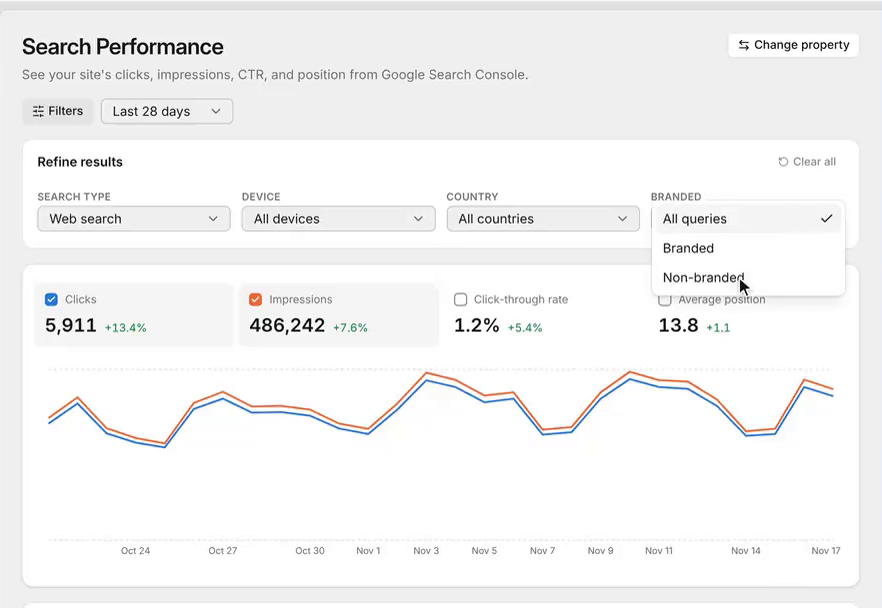
Compare the two views before you look at any single query. In the demo, impressions barely move between All queries and Non-branded (486,242 against 454,231), while clicks fall by more than 40%. Branded searches are a small share of impressions and a large share of clicks, because people who search your name usually click you. Click-through rate drops from 1.2% to 0.7% once they're gone. That lower number is your real starting point for CTR work.
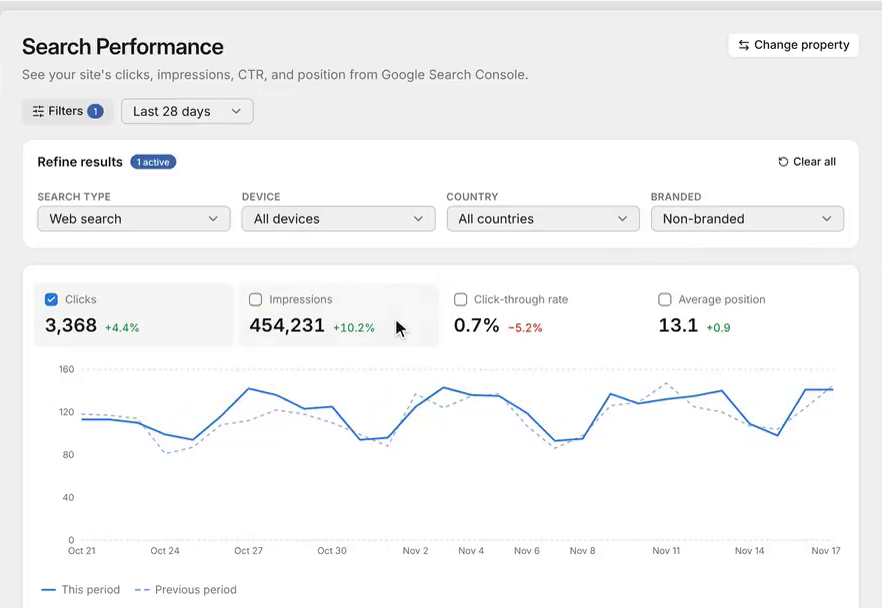
Turn off every metric except Clicks and the chart adds the previous period as a dashed line. Days where the solid line runs under the dashed one are the days to investigate.
Why Google's label beats a brand-name regex
Before Google shipped the label, the standard approach was a regex on your brand name in Looker Studio or a spreadsheet. It has two problems that the label fixes.
First, a regex only sees the queries Google shows you. Google's label covers every click, including the ones with no query attached, so branded plus non-branded always adds up to your total. In my study, the two labeled rows summed exactly to the property total on every eligible site.
Second, a regex only knows the spellings you thought of. Google describes its label like this:
It includes your website brand name in all languages, typos, and also queries that don't include the brand name but refer to a unique product or service of the site.
When you run a regex on the visible rows anyway, it tends to overstate brand. Across the eligible sites I measured, the median regex share was 12.8% against 10.5% from Google's label. On one of my own sites, the regex called 59% of clicks branded and Google called it 30%. The visible rows overweight brand because branded queries are the ones Google rarely hides.
Most of the traffic Search Console hides is non-branded
Search Console drops the query from a large share of clicks. I've written about why it hides most of your searches and how to reconstruct them. The brand label adds a new fact: you can now see how many of those hidden clicks were branded.
Across 16 eligible sites with at least 30 clicks between February 21 and November 15, 2026, the median share of hidden clicks labeled branded was 5%. Branded and non-branded clicks lose their query at very different rates:
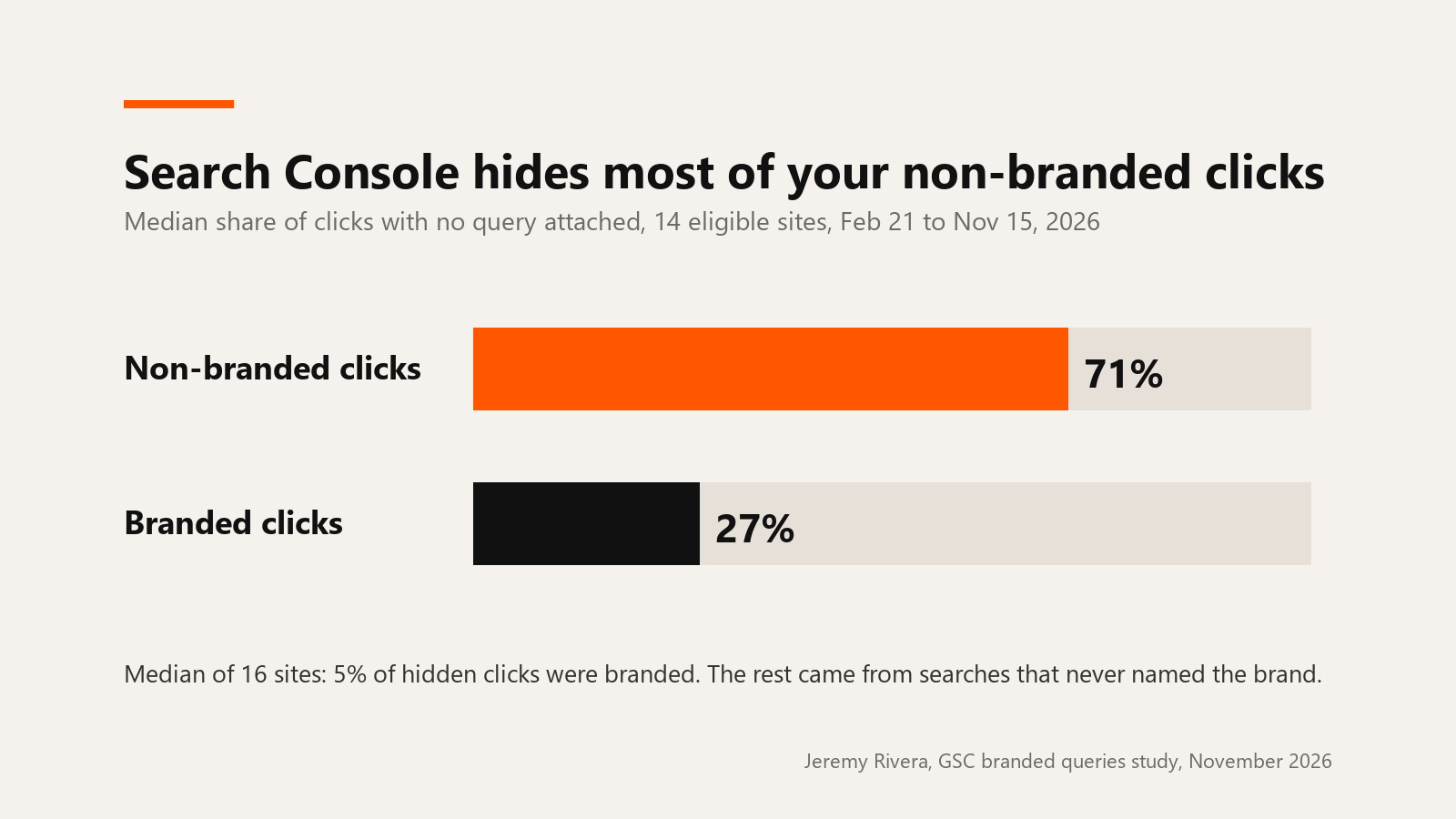
Branded searches repeat. Thousands of people type the same company name, so those queries clear Google's privacy threshold and show up in your table. Non-branded searches are long and varied, so most of them never get a row. Two of the sites in the study were exceptions: a restaurant chain where 85% of the hidden clicks were branded, and an ecommerce brand at 51%. When the business is the brand, people search the name, and the hidden clicks follow.
The practical result is that the Non-branded view is the one with the most missing queries. Biggest changes and the query table will show you the head terms. The rest of the movement sits in clicks you can count but can't name, which is where the page-level view and the dark query triangulation come in.
When the Branded filter shows nothing
Google limits the label to "top level properties" and to "sites with a sufficient volume of queries and impressions." When a property doesn't qualify, Search Console returns no labeled rows, and no error tells you why. Check these before you assume your site has no non-branded traffic:
- Use a domain property or a root URL-prefix property like
https://example.com/. In my tests,http://prefixes and subfolder prefixes never qualified. Of 27 domain properties, 10 returned labels. Of 67 URL-prefix properties, 9 did. - Don't judge by size alone. A root prefix with 62 clicks in three months qualified, while a domain property with 267 clicks didn't.
- Compare periods that both fall after February 21, 2026, when the labels start. A 16-month window shows labeled data for only part of the range.
If your site doesn't qualify, the brand-name regex is still your fallback. Run it knowing it will overstate brand.
Where the label gets it wrong
Google is upfront that the label is imperfect: "some queries may occasionally be misidentified." There's no way to correct it, so check it.
On a podcast site I run, Google labels the search "unscripted small business podcast" as non-branded, even though Unscripted is the show's name. Labels miss most often on:
- Brand names that are also ordinary words, like "unscripted"
- Your brand combined with a platform or integration name
- Close misspellings that Google doesn't connect to you
To check, set the filter to Non-branded and read the top 20 queries by clicks. Any query that contains your name, a product name or an obvious misspelling is branded traffic counted as earned. Subtract those clicks by hand when you report.
What to do with the non-branded view
Cyrus Shepard of Zyppy SEO argues that the branded side tells you something too. On the Unscripted SEO podcast he said:
You want to look at, and you can do this yourself in Google Search Console or whatever tool, what percentage of your inbound traffic is branded and compare that to your competitors. And you don't want to be below the average. You want to be above the average.
So track both, as separate lines. Then work the non-branded view like this:
- Report non-branded clicks as the SEO number. Put branded clicks next to it as brand demand, and note anything that moved it: a launch, an ad campaign, a press mention.
- Open Biggest changes under Non-branded and start with the queries that lost the most clicks. Click each one and check which page ranks for it now. A different URL than last period usually means two of your pages are competing for the query.
- Check whether position or click-through rate moved. A query that held its position but lost clicks points to the search result itself: a new AI Overview, a competitor's richer snippet, or your own title.
- Take the gainers and look for the pattern. If three of the five are questions, that's the format to write more of.
- Grow the branded line on purpose. Ann Smarty of Smarty Marketing put it plainly on the podcast: "So start doing something real and establish your branded queries very well. Control as many results there as you can." Search your own name and make sure every result on page one is one you'd want a buyer to click.
Ernesto Ortiz compares the two lines over time for a reason. On the same episode, he added:
then you compare non-brand traffic with brand traffic. Is brand traffic going down? Is brand traffic staying somewhat the same or is it growing exponentially?
A site where both lines rise is building demand and capturing it. A site where branded climbs and non-branded stays flat is living on its reputation. Content has stopped bringing in new people.
Ask your agent for the split
With OpenSEO MCP connected, your agent can read the same branded and non-branded split from Search Console, with no credits. Paste this into Claude, ChatGPT or any MCP client:
Use OpenSEO to pull Search Console data for my project for the last
28 days and the 28 days before.

1. Split clicks and impressions by Google's branded classification.
   Tell me branded vs non-branded clicks for each period and the
   percent change for each.
2. If the split comes back empty, tell me the property is probably
   not eligible, and fall back to a regex on my brand name.
3. For non-branded only, list the 10 queries that lost the most
   clicks. For each, show the page ranking for it now and whether
   its position or its click-through rate changed.
4. List the top 20 non-branded queries by clicks and flag any that
   contain my brand name, a product name or a misspelling of either.
Your total clicks will keep going up as long as people hear about you. The non-branded line is the one SEO has to earn. Check it before anything else in your monthly report.
