Introducing AI Visibility in OpenSEO
OpenSEO now finds questions people ask about your market, compares answers across models, and tracks whether ChatGPT, Gemini, and Google AI Overviews mention your brand or cite your site. Tracking costs $0.002 per answer.
By Carter Smith
More of your customers ask ChatGPT what to buy before they ever see a search results page. None of those conversations show up in Search Console. Unless they pay for a separate AI tracking tool, most teams type the question in themselves and hope the answer they got was typical.
Today we're launching AI visibility in OpenSEO. It finds questions people ask about your market and shows you what each AI model says. It tracks whether ChatGPT, Gemini, and Google AI Overviews mention your brand or link to your site, and which competitors they recommend instead. Tracking costs $0.002 per answer, on the same $10/month plan as everything else in OpenSEO.
There are three new pages in your project sidebar: Prompt Research, Prompt Explorer, and Prompt Tracking. The screenshots below follow Bitwarden, the open source password manager.
Find the questions worth tracking
Prompt Research starts from a keyword and lists questions people ask about it, most common first, with ChatGPT's answer to each and the sites it cited.
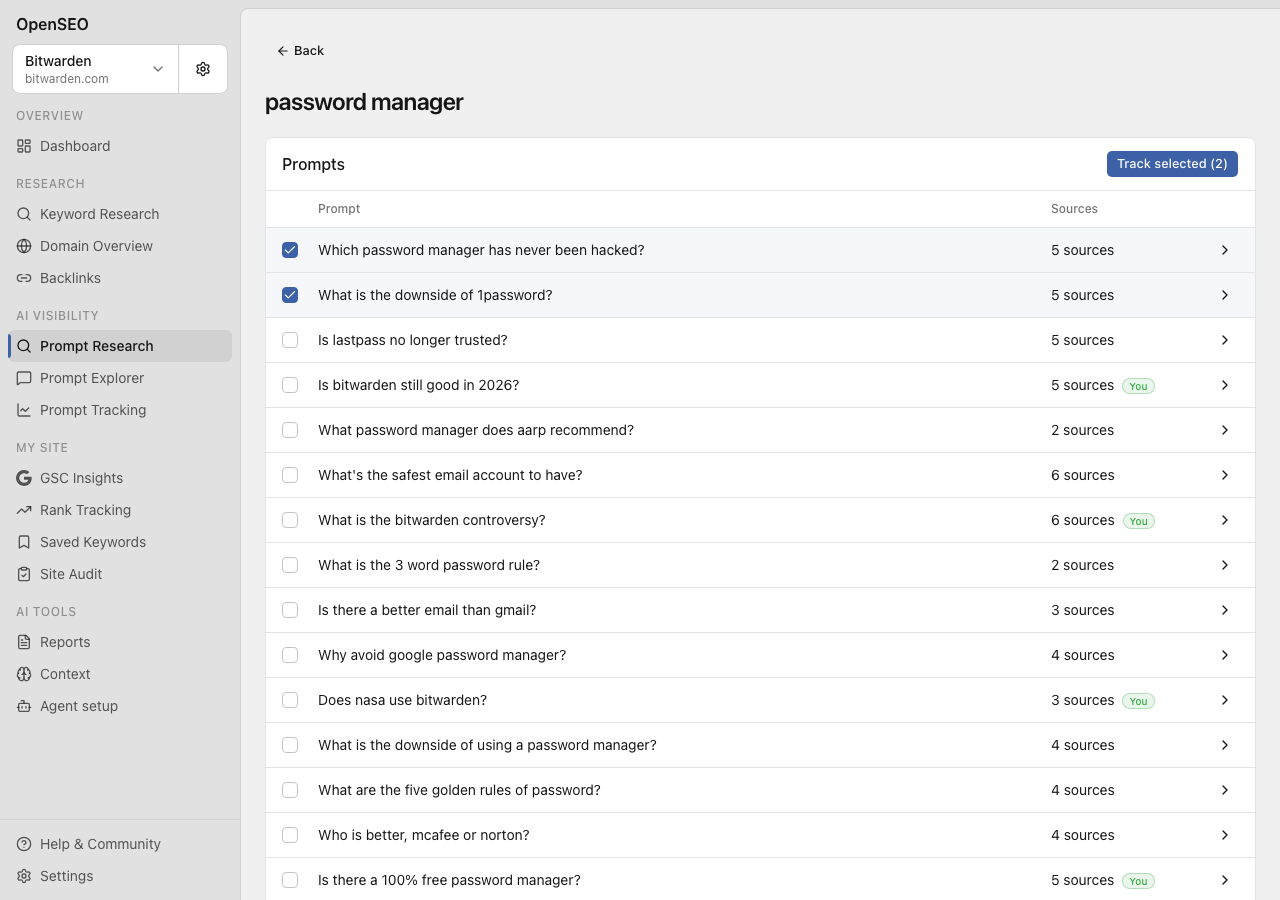
This is where we'd start. Questions like "which password manager has never been hacked?" are the ones where an AI answer decides which products a buyer hears about. Tick the ones that sound like your customers and click Track selected to add them to Prompt Tracking.
Prompt Research covers US English for now, and each keyword costs about $0.25 to analyze.
See what each model says
Prompt Explorer runs one prompt through any mix of ChatGPT, Claude, Gemini, and Perplexity and shows the answers side by side. You get each full answer, the sources each model cited, and the related searches it ran while answering. Add your brand name and OpenSEO flags which answers mention you. We've updated Prompt Explorer to use the latest models from each provider, so the answers you compare are accurate to what those models say today.
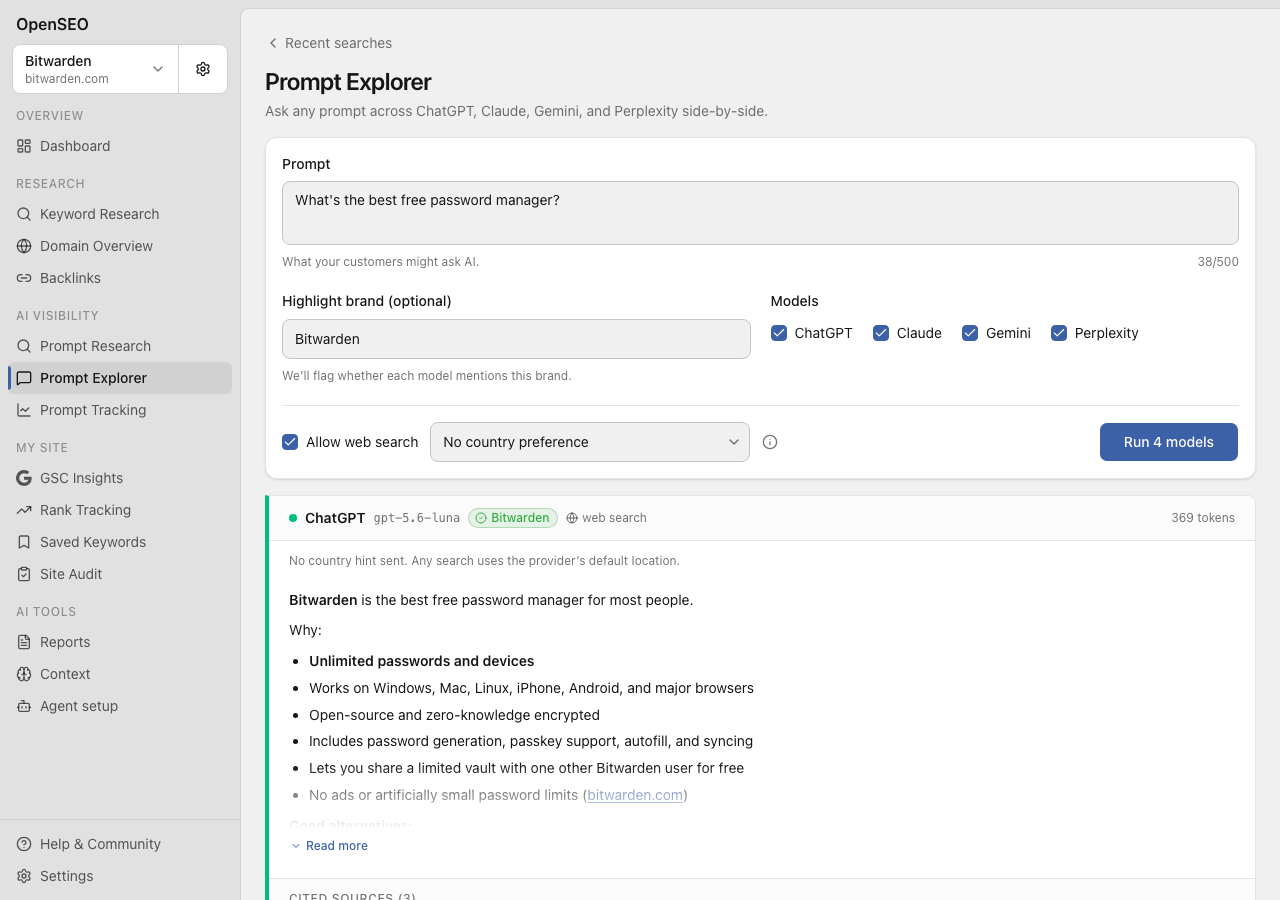
Use it before you commit a prompt to tracking, or when you want to see how a competitor gets described. Each answer is billed on the model's actual usage, which runs from a few cents to about $0.20 for Claude with web search. Rerunning the same prompt with the same models and settings within seven days is free.
Track whether you show up
Prompt Tracking is similar to rank tracking: set up a schedule for the prompts you want to monitor over time. Save the questions that matter to your business, group them into topics, and pick a market and the engines to check: ChatGPT, Gemini, and Google AI Overviews. Run a check whenever you want, or schedule one daily, weekly, or monthly.
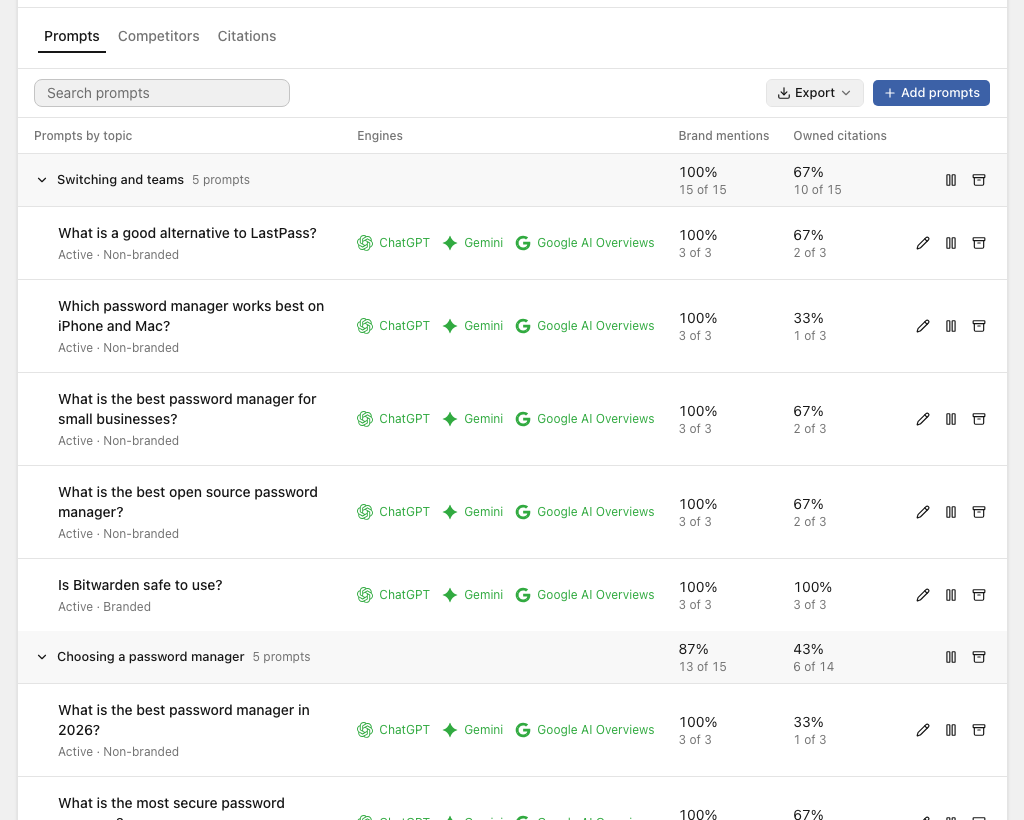
For every answer, OpenSEO records two things separately:
- Brand mention: did the answer name you?
- Owned citation: did the answer link to your website?
They often disagree. ChatGPT can recommend you without linking to you, and an AI Overview can cite your blog post without naming your product. The chart tracks both over 7, 28, or 90 days, broken down by engine. Prompts that include your own brand name are left out of the trend, so "is Bitwarden safe to use?" doesn't inflate Bitwarden's numbers. Open any prompt to read the full answers from its recent checks.
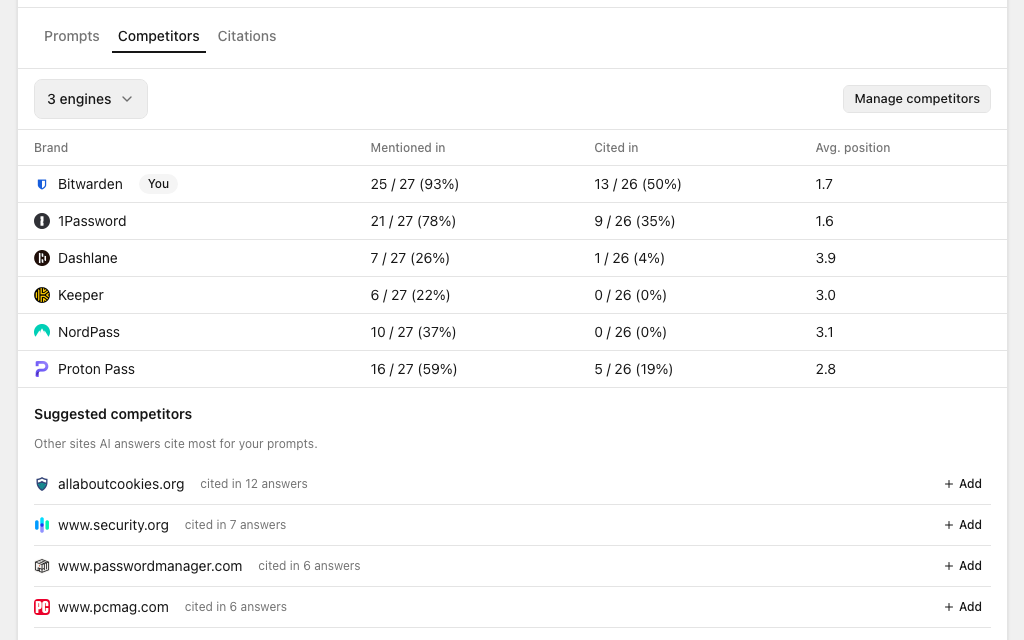
The Competitors tab shows how often each competitor was mentioned or cited in the latest check, and where they tend to appear in the answer. Bitwarden does well on mentions: it was named in 25 of 27 non-branded answers, ahead of 1Password at 21. Its own site was cited in only half of them, though, which is where the Citations tab comes in.
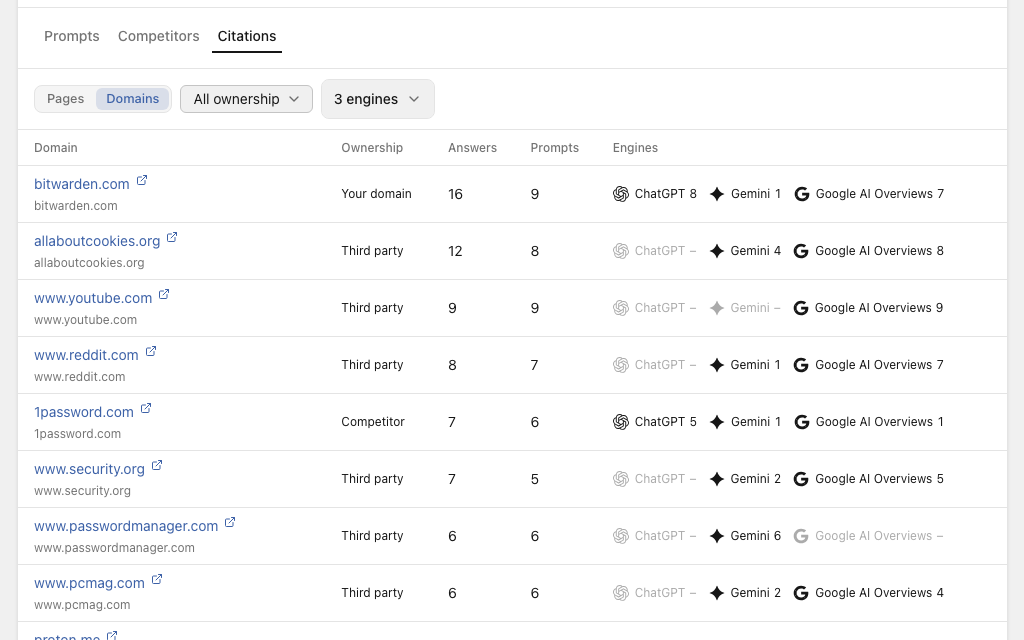
The Citations tab lists every page the latest answers cited, grouped by page or by domain. Filter it to third-party domains and you get a short list of the review sites, comparison posts, and docs that the models lean on for your category. For password managers that's review sites like allaboutcookies.org, security.org, passwordmanager.com, and PCMag. allaboutcookies.org alone was cited in 12 answers, more than 1Password's own site. Those are the pages worth getting onto.
AI answers vary from run to run. Ask the same question twice and you can get two different lists of brands, so judge your visibility by the trend over a few weeks, not by one check. When a check fails, OpenSEO marks it as failed and leaves it out of your rates instead of counting it against you.
What it costs
Each tracked answer costs $0.002. Twenty prompts checked on ChatGPT and Gemini is 40 answers, or $0.08 per check. Weekly, that's about $0.32 a month. Daily, about $2.40. Either fits inside the $10 plan's included credits with plenty left for keyword research, rank tracking, and audits.
Setup research and generated prompt suggestions use a small amount of credits. On hosted OpenSEO, Prompt Research and Prompt Explorer need the paid plan; Prompt Tracking only needs credits. If you self-host, you pay DataForSEO and OpenRouter directly at their rates. The full breakdown is on the pricing page.
Where the answers come from
Tracking collects answers from the consumer versions of ChatGPT and Gemini, the same products your customers use, through DataForSEO. AI Overviews come from real Google results pages. Prompt Explorer asks each model through its API instead, which is useful for comparing models but can differ from what the consumer apps say. Prompt Research is built on DataForSEO's question data, with ChatGPT's answers and the sources they cited.
Use it from your AI agent
Everything above is also available through OpenSEO MCP, so Claude, Codex, Cursor, or any other MCP client can research prompts, compare models, set up tracking, and read your results. Reading results costs nothing. Before a paid check or schedule, the agent has to get a cost quote and pass along the spending limit you approved, so it can't start paid tracking without a price attached.
We're also shipping two agent skills with the OpenSEO plugin:
- AI Prompt Research finds questions people ask about your market and which sites ChatGPT's answers cite.
- AI Visibility Audit looks at why competitors appear where you don't and what to change.
In Claude Code:
/plugin marketplace add every-app/open-seo
/plugin install openseo@openseo
Then ask:
What questions do people ask about password managers, and which sites do ChatGPT's answers cite? Tell me which ones are worth tracking.
Get started
Open a project in OpenSEO and go to Prompt Tracking. If AI visibility isn't set up for the project yet, click Start research: OpenSEO researches your website, fills in any missing business overview and competitors for you to review, and drafts a few topics with starter prompts. Nothing gets checked until you click Run now or start a schedule.
The AI Visibility guide walks through every setting. If something doesn't work the way you expect, tell us.
