Get a Weekly SEO Report Without Building Anything
One copy-paste prompt sets up a Monday morning email that tells you what moved and what to fix. Costs nothing to run...
By Sohan Bhat
Most business owners open Google Search Console about twice a year, and usually for the same reason. Traffic tapers off and you're sent digging for the issue. By the time you're actually within the data, the drop you're chasing happened four weeks ago. At that point, you've shipped a redesign and rewritten the pricing page for your website. The culprit gets lost within all the progress.
This article gives you the prompt that removes the need to do any guesswork. You paste into Claude once, change three things, and every Monday morning a short report shows you what moved on your website and what to do about it.
Copy This
Set up a recurring scheduled task for me.

SCHEDULE: Every Monday at 8am, my timezone.

EACH RUN, DO THIS:

Using the OpenSEO connector, pull Google Search Console data for
[yourdomain.com]. Search Console runs about two to three days behind,
so use the most recent 7 days of COMPLETE data rather than the last 7
calendar days:
- That 7-day window: clicks, impressions, average position, CTR,
  broken down by page and by query
- The 7 days immediately before that window, same breakdown

Compare the two weeks and look for exactly two things:

1. PAGES LOSING TRAFFIC
   Any page that lost 20% or more of its clicks versus the previous
   week. Ignore pages with fewer than 10 clicks in either week, since
   small numbers swing wildly.

2. QUERIES GOOGLE IS SHOWING BUT NOBODY CLICKS
   Any query with 100+ impressions and a click-through rate under 2%.
   These usually need a better title or description, not new content.

THE REPORT:

Keep it under 200 words. Structure:
- One sentence: total clicks this week vs last, up or down.
- What you found, in two or three bullets. Name the actual pages and
  queries.
- ONE thing to do this week. Specific enough that I could start it in
  the next ten minutes.

Rules:
- No tables. No dashboards. No lists of every metric you pulled.
- If nothing crossed those thresholds, say "nothing needs attention
  this week." Do not invent something to report.
- Don't guess at causes you can't see in the data. Say "unclear."
- Write like a colleague sending a note, not like a reporting tool.
- If the Search Console pull fails, say so at the top of the report
  instead of skipping the week.

Before scheduling, run it once now and show me the result.
There are only three things you need to change:
Change your domain, the day and the time if Monday doesn't work for you.
This prompt ensures that Claude runs the whole thing while you observe, so you know what you're getting into before it lands weekly.
Starting from scratch
About five minutes start to finish:
- Create an OpenSEO account and add your website as a project.
- Connect Google Search Console from the sidebar of your project. This is the step that makes the rest work, since Search Console is where the real data about your site lives, and it's also why the report is free to run.
- Add OpenSEO as a connector in Claude, at claude.ai/customize/connectors, using the MCP URL from the agent setup page in OpenSEO. This is the step that matters for scheduling.
- Paste the prompt into Claude and confirm the schedule when it asks.
If you work in Claude Code, you can add the same server from the terminal:
claude mcp add --transport http --scope user openseo https://app.openseo.so/mcpHow scheduling works in Claude
- Scheduled Tasks live under Scheduled in the Claude sidebar. You can also type /schedule inside any conversation to set one up without leaving your work.
- Each run happens on Anthropic's servers, not your machine. The Monday report goes out whether your laptop is open, closed or packed into a suitcase.
- Every run opens as its own thread on the Scheduled page, with the full report inside it. That page is your archive, so you can scroll back through past weeks.
- Each task has its own Notifications tab with toggles for push and email. Turn those on and you'll get a reminder when the Monday run finishes. If a notification doesn't come through, the report is in the thread waiting for you.
- Frequency options are hourly, daily, weekly, or manual. Weekly is the most suitable for this report.
The two things it checks:
Check 1: Pages Losing Traffic
Content rarely collapses in one moment. It erodes one page at a time until the individual losses compound, showing up in your overall traffic graph weeks later.
Comparing data week by week catches any mishaps early on, especially when fixing it is much cheaper.
The ten-click floor is also factored in because a 20% drop is significant when there is enough traffic supporting it. Without the floor, you'd get a dozen alerts taking away from the pages that matter.
Check 2: Queries getting impressions but few clicks
A high impression count with a click-through rate under 2% should naturally raise a red flag. Google decided that your website was relevant enough to show however almost nobody is choosing to interact with your page.
The gap is usually the title and meta description rather than underlying content. This makes the fix really easy; rewriting a title takes ten minutes, and you keep the position you already earned.
Zero credits. Actually zero.
Most SEO tools charge you for every step.
Search Console data doesn't cost credits in OpenSEO. It's your data so Google gives it to you for free.
Run this weekly for a year on the $10 plan and your usage doesn't move. The credits in OpenSEO go toward pulling data from outside your own site, keyword volumes, competitor backlinks, live SERP results. Your own Search Console data sits outside that entirely.
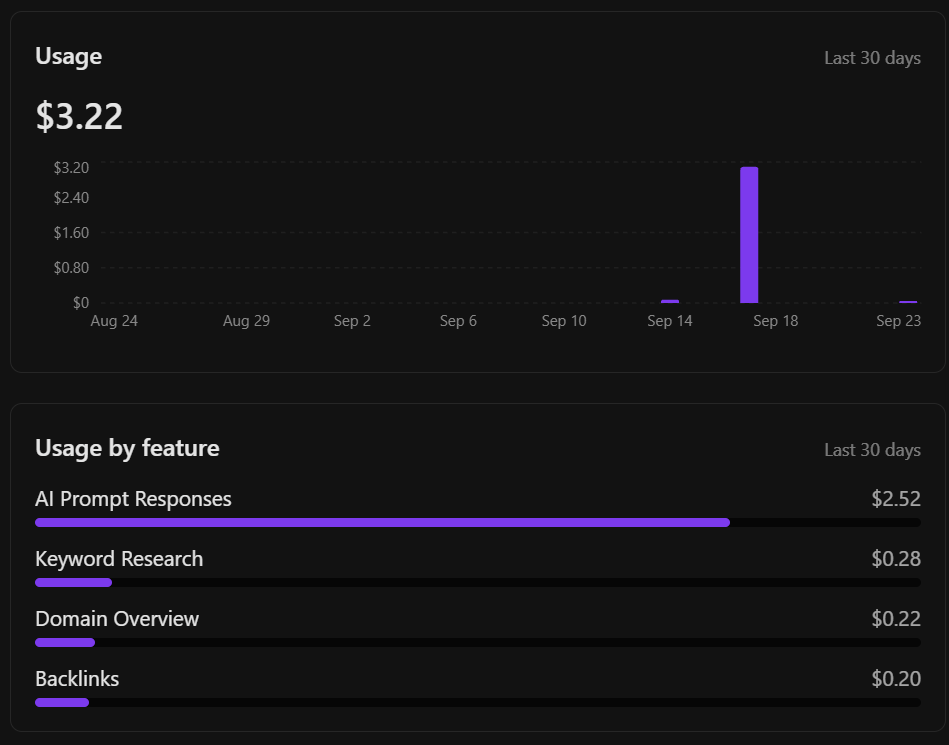
Usage by feature - GSC Insights doesn't appear because Search Console pulls zero credits
Why 200 words
That word limit is the first thing people delete when they customize this prompt.
Reports can be verbose at times whether it be forty detailed metrics or an unnecessary chart, it is natural to skim through the report after the first few sentences. The real value of the report is in the recommendations.
Compare that to: "pricing page dropped 34%, it's down at position 9, rewrite the title." Now you have actionable insights that you can fix the next day.
A model will look for problems and this manufactured sense of urgency stops matching the needs of your website quickly. The 200 word limit is the crutch that fixes it. Each report is short enough to remember and for you to start to recognize the patterns.
Make it complain when it breaks
Connections expire, and Google's API can fail. At some point, a Monday will go by with no report.
As a business owner, it's important to plan for mistakes in advance. A week with no problems flagged and a week where the report never ran leave you in the same vulnerable position.
The last rule in the prompt becomes your safety net. If the Search Console pull fails, Claude reports the error instead of skipping the week, so the break announces itself.
If OpenSEO gets disconnected from Claude, the task has no tool to call, thus no report gets returned. When reports stop, check the Search Console connection in OpenSEO first, then check that OpenSEO is still connected to Claude.
Once it's running
Leave it alone for a month. Let it build a routine around your business.
After four weeks you'll start seeing patterns you wouldn't have caught manually. A page that's been leaking clicks for three weeks or a query with 400 impressions and a 1.1% CTR that nobody could notice.
You can take these findings and push it further:
- Flag queries ranking between positions 8 and 20 with decent impressions. Those pages are one edit from page one, which is where clicks actually live.
- Pull the live search results for anything that dropped. You can see who took your spot instead of guessing.
- Write the new title instead of telling you to. As it knows the query, title and position.
It all starts with the plain report. The rest follows your company's needs naturally.