SEO for Startups: A Founder’s Handbook
A founder-focused handbook to SEO for startups: how to use search for market research, early rankings, and smarter growth without wasting time.
By Ben Senescu
If you've started a company, you've probably considered investing some time into SEO for your startup, or search engine optimization. In this guide, I'll try to give you an overview of how you should be thinking about SEO as someone building something new.
SEO compounds as your brand builds its reputation. It can also help with market research before you have a website.
If you want an agent to help, connect OpenSEO MCP first so it can use live keyword, SERP, domain, backlink, and saved keyword data. If you are not sure where to start, use the SEO coach. If you are setting up SEO for a new company or site, begin with SEO project setup.
Table of Contents
- Mental Model: How does SEO affect your business?
- Market Research Techniques
- How can you improve your site's rankings?
- A simple founder SEO priority list
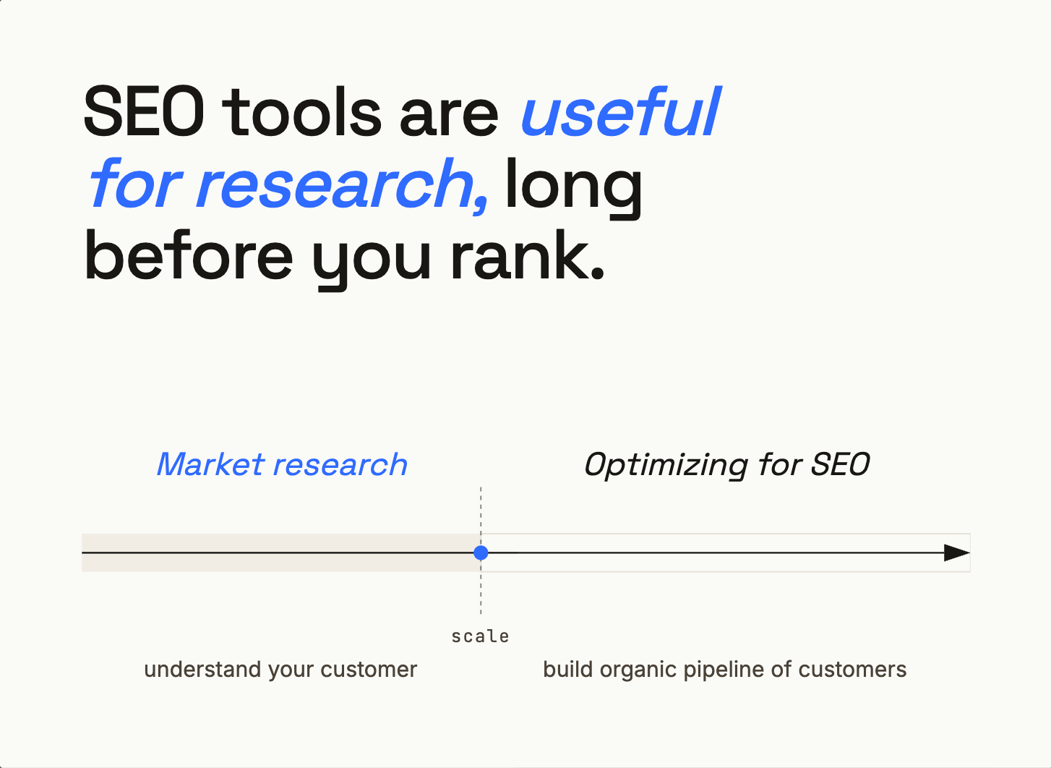
Mental Model: How does SEO affect your business?
Improving your site's rankings
Google's goal is to show the website, or AI answer, most likely to satisfy the user's search. Your ranking improves when Google shows your website for a search term, the person clicks, and then finds what they were looking for.
The major ways to improve SEO are still pretty simple:
- Your website's domain name, title, and description engage customers
- You have quality content that satisfies the user's search
- Reputable websites link to your brand, increasing your authority
Lots of guides and influencers will try to sell you shortcuts for SEO. For new companies, you will usually do better if you treat SEO as a side effect of good marketing rather than the main way to drive growth. If you understand your customer best, provide a unique offering, and have customers and thought leaders in your space recommending you, your ranking will improve faster than it will from chasing specific SEO tricks.
Market Research
In 2026, when founders research a new market, they often reach for Claude or ChatGPT to do "Deep Research." These tools search the web, read Reddit conversations, and pull together industry reports and blog posts faster than most of us would by hand.
That research is good for qualitative context. It helps you understand how people talk, what themes come up, and which companies are getting attention. SEO tools give you a different signal. They show what customers search for, which pages Google rewards, and where competitors get traffic.
SEO tools can help answer questions like:
- Which competitors in the space are the most popular and trusted?
- What are people searching when Google recommends my competitors?
- Which of my competitors' pages drive the most traffic?
- What blog posts or pages should you add to your website to help customers and drive traffic?
- What information does Google's algorithm think your customers are looking for?
Market Research Techniques
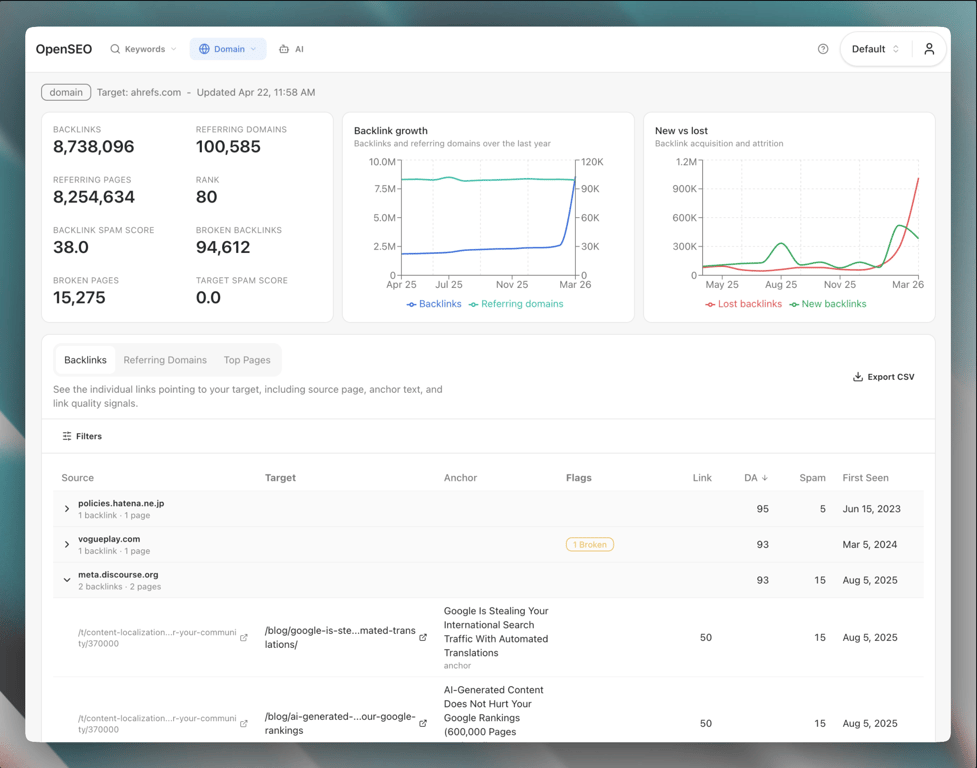
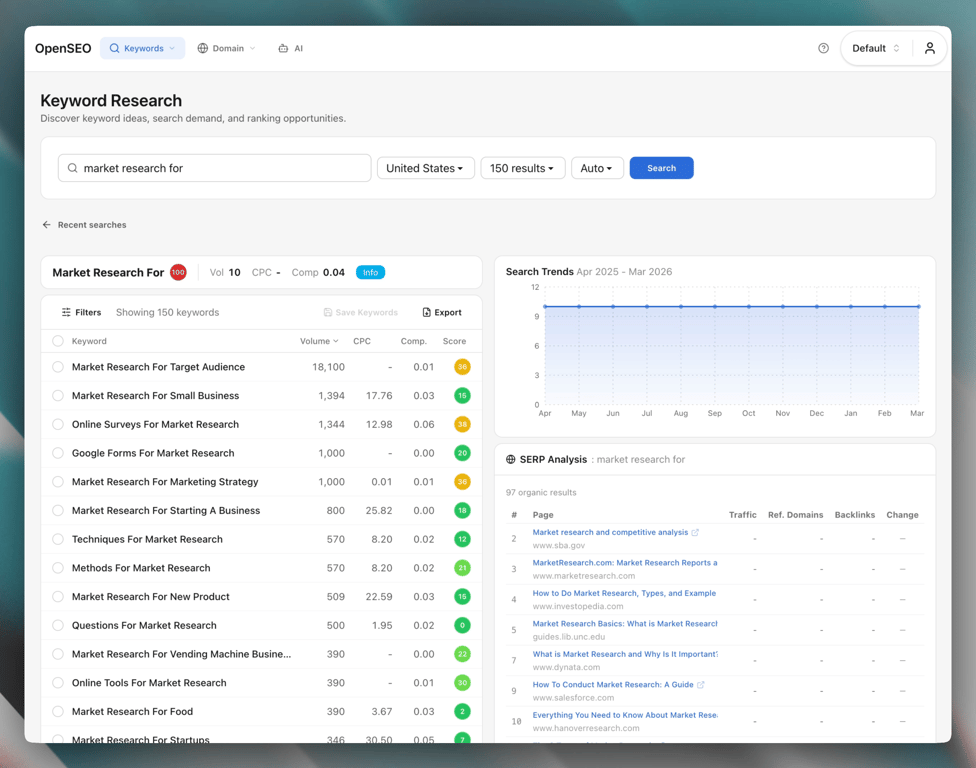
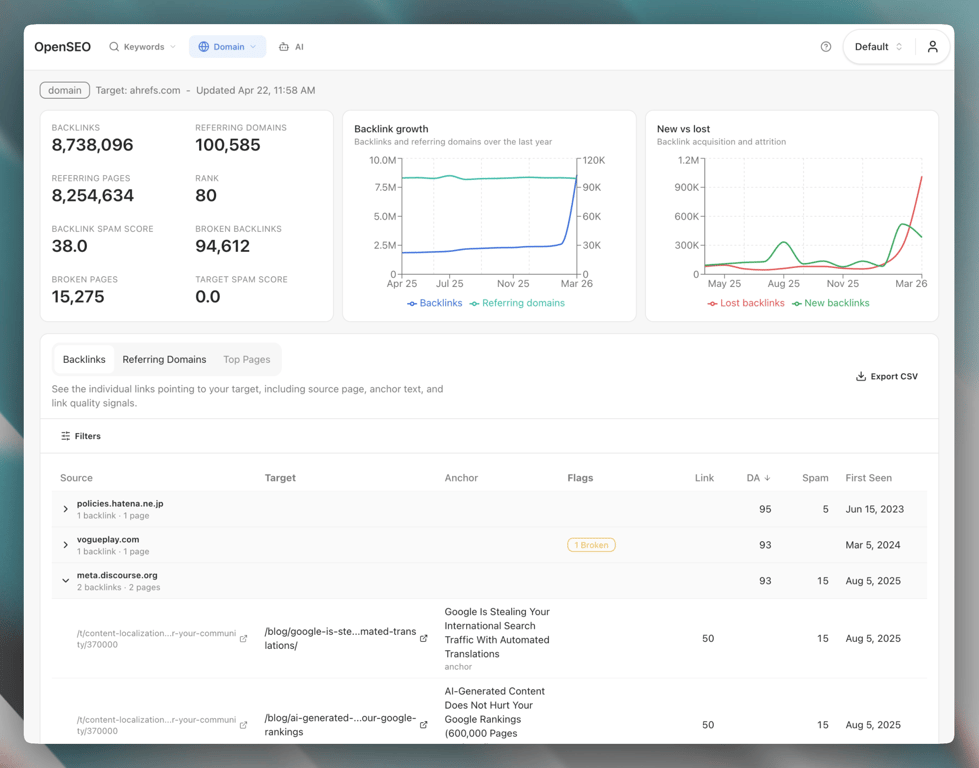
The screenshots below show what this data looks like in OpenSEO.
Competitor Research
Competitor research gives founders a fast read on market demand.
With a tool like OpenSEO, you can enter a competitor's domain and see which keywords it ranks for, which pages are ranking, and where the estimated traffic seems to come from.
That can shape your strategy. If a competitor gets traffic from a specific page type, buyers may care about that topic more than you realized. It can also reveal use cases, niches, or workflows that fit your product but do not show up in a few customer calls.
For a focused workflow, use the competitor analysis skill. If you are still figuring out which domains matter, start with the broader competitive landscape skill.
Keyword Research
Keyword research shows how much search volume exists for certain terms, related searches, and whether a query is informational or commercial. Not every search is equally valuable. Simple answer-style searches may send fewer clicks because Google can answer them on the results page. Searches with comparison, workflow, or buying intent often work better because people still want detail, options, and proof.
It also helps map a market. If you search a seed phrase like "best crm for," the suggested and related keywords can show you which audiences are worth attention: agencies, startups, consultants, real estate teams, and so on.
For a repeatable workflow, use the keyword research skill. When you have a useful list of ideas, use the keyword clustering skill to group them into page targets.
Backlink Analysis
Backlink analysis shows which websites link to a specific website.
When you look at who links to competitors, you start to see which publications, directories, newsletters, and communities matter in the market. You can also see why certain companies are treated as credible. Sometimes they earn attention through PR. Sometimes it is partnerships, original research, or a useful tool that people keep citing.
Those links can tell you how attention moves through a market. To look at one domain right now, the free backlink checker shows its referring domains and strongest links without an account.
How can you improve your site's rankings?
You do not need to become an SEO expert to make progress. For most founders, covering the basics and avoiding obvious mistakes is enough.
Site Title & Description
Your page title and meta description are the billboard Google shows searchers.
They play a big role in whether someone clicks. A good title matches the search, tells the reader what they will get, and gives them a reason to choose your result. If someone searches for "inventory software for small manufacturers," that page should look like it was written for that need.
Google Search Console
Google Search Console is your source of truth for how your site is performing in Google Search.
It helps you see what queries you show up for, which pages get impressions and clicks, whether Google is indexing your pages, and what crawl or coverage issues need attention.
Search Console only covers sites you own and lags by a couple of days. To discover keywords another site ranks for, use the free competitor keyword finder. It shows up to 20 keywords from the provider’s database, with available search volumes, positions, and ranking URLs. Results may be cached for up to 24 hours.
If you're new to it, Google's docs are worth reading:
Site Audits
Site structure can get deep. There is a whole specialty built around it called "Technical SEO". If you're starting out, do not obsess over perfect audit scores.
The main things to care about are:
- Does your website load fast enough that users do not bounce?
- Can Google crawlers find all the pages you want indexed?
- Is the structure of the site clear enough that both users and search engines can navigate it easily?
For most teams, a quick pass with Google Search Console or any site audit tool (e.g., Ahrefs, Screaming Frog) is enough to find the highest-priority issues.
If you're non-technical, use the SEO tooling built into your CMS or hosting provider and fix the major problems. If you are technical, run an audit and resolve the highest-priority crawl, indexation, broken link, or performance issues. Your coding agent can help with the implementation.
Quality Content
Google wants to show relevant pages that satisfy the search. If people land on your site and find what they wanted, your website will climb the rankings.
There is no shortcut here. The page has to be useful.
That does not mean every company needs a giant blog. It means the pages you do publish should do a clear job well. They might explain something your buyer needs to understand, compare options, answer a buying question, or solve a specific workflow problem.
You can use AI to help write content. The bar is still the same: if the page is better than the alternatives for the search term, it has a chance to climb. If it is vague, padded, or interchangeable with everything already ranking, it probably will not.
Backlinks
Backlinks are when other companies link to your website. They signal your website's authority on the topic that the linking page ranks for.
There are plenty of sketchy offers for backlink exchanges and paid placements. Some may move a metric, but they rarely help the business.
The backlinks that tend to matter most are the ones that make sense for your business regardless of their SEO benefit. Some examples: a niche publication, a respected directory, a relevant newsletter, a partner case study, or a useful piece of research that people cite.
The best way to get those links is to give people a real reason to talk about you. Publish a strong customer story, create original data, build a useful free tool, or get listed in the places your market trusts.
For a focused outreach workflow, use the link prospecting skill. If you want an AI agent to help with this work, set up OpenSEO MCP so it can use live OpenSEO data. If you are new to the process, start with SEO coach. For a fresh project, use SEO project setup before jumping into research.
A simple founder SEO priority list
If you're still not sure who your customer is, rankings can wait. Use SEO tools for research first.
When you're ready to start focusing on SEO, this is a good order:
- Make sure the product, positioning, and site messaging are clear
- Run SEO project setup so goals, scope, and data sources are clear
- Set up Google Search Console and OpenSEO MCP
- Fix major crawl, indexation, and performance problems
- Identify the core searches that map to your product and customer pain points
- Build or improve the pages that deserve to rank
- Use competitor analysis and keyword research to find obvious gaps
- Earn mentions and links by doing things worth citing
Final thought
SEO is worth understanding as a founder because it shows what the market is asking for, what Google believes users want, and whether your company appears as a credible answer.
Used well, it becomes both a research tool and a compounding distribution channel. Understand the customer, make useful pages, keep your site healthy, and give people a reason to talk about your company.
If you want to explore this data yourself, OpenSEO is an affordable SEO tool built by a founder for founders, without the usual bloat of tools made for SEO power users.
